Split any bill
in a snap.
Snap a photo of any receipt, tap who had what, and everyone gets their exact total, with payment links and gentle automatic reminders.Free to get started, and set up takes under a minute.
The Corner Table
Fri · 8:24 PM · Table 12
- Margherita14.00
- Carbonara18.50
- House Red ×222.00
Scanned by SnapySplit
Maya
$25.00
Jordan
$18.50
You
$11.00
Why people trust SnapySplit
- Penny-perfect splits, every time
- Set up in under a minute
- Free to get started
- Any receipt: rent, groceries, trips
- Automatic reminders, zero nagging
- Venmo, Zelle & Cash App ready
Snap, split, and settle in seconds
The real app. Receipt scanned, friends tagged, payment requests sent, and Venmo settles up, all without anyone reaching for a calculator.
The scenario
Sarah covered the $38.56 grocery run. Watch SnapySplit get everyone to pay her back, in seconds.
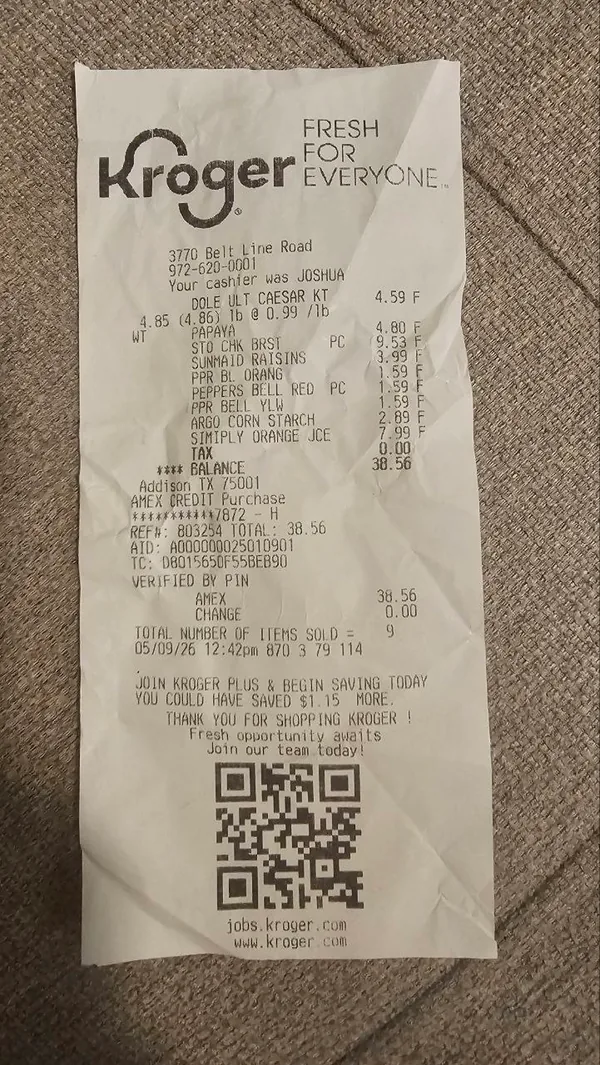

- Caesar salad kit$4.59
- Papaya$4.80
- Chicken breast$9.53
- Sunmaid raisins$3.99
- Bell pepper, orange$1.59
- Bell pepper, red$1.59
- Bell pepper, yellow$1.59
- Argo corn starch$2.89
- Simply Orange juice$7.99
- SarahYou · Organizer
- Alex
- Sam
- Jordan
- Maya
- Caesar salad kit$4.59
- Papaya$4.80
- Chicken breast$9.53
- Sunmaid raisins$3.99
- Bell peppers ×3$4.77
- Argo corn starch$2.89
- Simply Orange juice$7.99
- $8.58›Sarah
- $7.69›Alex
- $9.53›Sam
- $4.77›Jordan
- $7.99›Maya
- Alex$7.69PendingPaid
- Sam$9.53PendingPaid
- Jordan$4.77PendingPaid
- Maya$7.99PendingPaid
her preferred methods below
How it works
From receipt to paid back.
No spreadsheets. No group-chat math. No chasing anyone down. Three taps and it's handled.
Snap the receipt
Point your camera at any receipt: itemized, handwritten, or crumpled in your pocket. Our AI reads every item, tax, and tip in seconds. Three receipts from one dinner? Scan them all into a single split.
- Margherita14.00
- Carbonara18.50
- House Red ×222.00
Tap who had what
Add your group and tap each item to whoever ordered it. Shared a dish? Tap everyone. We split it evenly and divide tax and tip proportionally, automatically.
Everyone pays you back
Everyone in the split sees their exact total, down to the penny, with a direct link to Venmo, Zelle, or Cash App. SnapySplit handles the gentle reminders until everyone's settled up.
Why SnapySplit
Bill splitting that actually works.
Everything you need to settle up fast, and nothing you don't.
Split by item, not by guess
Assign every appetizer, entrée, and round of drinks to exactly who ordered it. No more “let's just split it evenly” when you only had a salad.
Penny-perfect, every time
Tax and tip split proportionally or evenly, your call. SnapySplit does the decimal math so nobody's total gets rounded up, or short.
One link, any payment app
Send exact totals with a direct link to Venmo, Zelle, or Cash App. Friends tap, pay, done. No manual entry, no typos.
Scan it, don't type it
Snap any receipt and AI reads every item, tax, and tip in seconds. Printed, handwritten, or crumpled in your pocket. No manual entry.
We chase, so you don't have to
Friendly, automatic reminders go out on your behalf until everyone settles up, so you never have to ask twice. We keep track of the receipts.
Free to get started
No credit card and no subscription to try it. Scan, split, and send payment links from day one. Optional premium features are on the way.
SnapySplit vs. everything else
The Splitwise alternative that reads the receipt for you
Typing every item into Splitwise, or sending a flat Venmo request for the total? There's a faster way to handle Venmo bill splitting, and it starts with your camera, not a keyboard.
| Feature | SnapySplit | Splitwise | Venmo request | By hand |
|---|---|---|---|---|
| Scan the receipt — AI reads every item, tax & tip | Yes — Snap a photo, done in seconds | No — Type every line yourself | No — No line items, just one number | No — Grab a calculator |
| Split by item — Not just an even share of the total | Yes — Tap who had what | No — Manual, one entry at a time | No — One flat amount per person | No — Do the math yourself |
| Sends a payment link — Venmo, Zelle, Cash App, or PayPal | Yes — Straight to their phone | No — Tracks who owes who, no payment | Yes — Yes, that's what a request does | No — You chase it down yourself |
| Reminds people automatically — Until the split is settled | Yes — Gentle nudges, hands-off | No — One manual reminder tap | No — No automatic follow-up | No — You're the reminder |
| Splits tax & tip fairly — Shared proportionally, automatically | Yes — Divided to the penny | No — You enter it by hand | No — Not itemized at all | No — More math for you |
| Free to get started — Core features, no credit card | Yes — Start splitting in a minute | No — Free tier is limited | No — Fees on instant transfers | Yes — Free, just slow |
| Final score, out of six features | 6 of 6 | 0 of 6 | 1 of 6 | 1 of 6 |
Pick an opponent

SnapySplit
Scan & settle
Splitwise
Track & type
Venmo request
One flat number
By hand
Napkin math
Scan the receipt
AI reads every item, tax & tip
Split by item
Not just an even share of the total
Sends a payment link
Venmo, Zelle, Cash App, or PayPal
Reminds people automatically
Until the split is settled
Splits tax & tip fairly
Shared proportionally, automatically
Free to get started
Core features, no credit card
6/6
SnapySplit
0/6
Splitwise
1/6
Venmo request
1/6
By hand
Looking for a Splitwise alternative, or just tired of Venmo bill splitting one flat request at a time? This is the easier way.
Get SnapySplitPricing
Splitting bills is free to get started.
No credit card and no tiers to decode. Scanning receipts, splitting by item, sending payment links, and automatic reminders: that's the core of SnapySplit, and it's free to get started today.
SnapySplit · Receipt
$0to get started
- Unlimited receipt scans0.00
- Unlimited groups & friends0.00
- Item-level, penny-perfect splits0.00
- Payment links: Venmo, Zelle, Cash App, PayPal0.00
- Automatic reminders until paid0.00
- No credit card to start0.00
No credit card to start. Thank you for splitting with us.
Free to get started today. We're building optional premium features for power users, and we'll always be upfront about what's included before you pay for anything.
Loved by splitters
Real groups, real relief.
From roommates splitting rent to friends closing out a group trip, here's what people say after their first scan.
We used to do napkin math and someone always got shorted. Now I scan the receipt, tap who had what, and everyone gets their exact total before we've even left the table.
Sarah K.
Dinner club organizer
Rent, groceries, the group trip to Tahoe: I've scanned all of it. The AI reads the receipt in seconds and nobody in our house has to open a spreadsheet again.
Marcus T.
Splits rent with 3 roommates
I used to be the one texting ‘hey, did you Venmo me yet?’ Now SnapySplit sends the reminder for me. I just get paid.
Priya R.
Group trip planner
FAQ
Got questions? We've got answers.
Is SnapySplit free?
Free to get started. No credit card to sign up, and you can scan, split, and send payment links from day one. We're building optional premium features for power users, and we'll always be clear about what costs money before you pay for anything.
How does receipt scanning actually work?
It's instant. Snap a photo of any receipt and our AI reads every item, price, tax, and tip in seconds: printed, handwritten, faded, even crumpled paper. Got drinks on one receipt and food on another? Scan both into the same split for one combined total. Review and edit anything before anyone gets charged.
What happens with shared items, tax, and tip?
Fully handled. Tap everyone who shared a dish and SnapySplit divides that item evenly between them. Tax, tip, and service charges can be split proportionally, based on what each person ordered, or evenly across the group. Either way, the math is penny-perfect, down to the cent.
How do people actually pay me back?
Through whatever they already use. Everyone in the split sees their exact total in the app, then taps through to pay you with Venmo, Zelle, Cash App, or any method you set up. Setting up an account takes under a minute.
What if someone forgets to pay?
We handle it for you. SnapySplit sends friendly, automatic reminders on your behalf until everyone's settled up, so you never have to send an awkward follow-up text.
Does it work for more than restaurant bills?
Any receipt works. Split rent and utilities with roommates, groceries with a partner, a group trip's hotels and rideshares, or a whole vacation's worth of expenses, all with the same scan and tap-who-had-what. See the guides on splitting a restaurant bill and splitting bills with friends.
Is my data safe?
Yes. Everything is encrypted in transit and at rest. We never sell or share your data, or use it for advertising. Your receipts and payment details stay yours. See our Privacy Policy for full details.
What platforms is SnapySplit on?
iOS and Android. Download it and split your first bill in under a minute.
Send the bill.
Get everyone paid back.
Scan any receipt, tap who had what, and SnapySplit gives everyone their exact total with a payment link: Venmo, Zelle, Cash App, whatever they already use.
Free to get started · quick account · set up in under a minute
Tonight's split
- You$18.50
- Maya$24.00
- Jordan$32.00